Контакты

+7 (495) 589-50-33

117046, г. Москва, ул. Гримау, д. 10. Станция метро Академическая – (3 мин. пешком).

info@pravomoscow.com

www.pravomoscow.com

Прием осуществляется по предварительной записи

Мы оказываем услуги по составлению договоров (трудовых, купли-продажи, аренды, поставки, подряда, займа, дарения, кредитных, поручения, учредительных, о сотрудничестве, на оказание услуг, страхования, хранения, мены, авторских, о намерениях, о материальной ответственности, о совместной деятельности, арбитражных соглашений и других), претензионных документов (исковых заявлений, претензий, ходатайств и пр.)

Интересующие Вас документы могут быть составлены на двух языках – русском и английском.

Чтобы заказать разработку любого из документов свяжитесь с нами по указанным контактам.

Widgetkit

Widgets

Currently available widgets

Slideshow

Slideshow

Grid

Grid

Grid Stack

Grid Stack

Switcher

Switcher

Map

Map

Accordion

Accordion

Gallery

Gallery

Grid Slider

Grid Slider

Slider

Slider

Parallax

Parallax

Slideset

Slideset

List

List

Popover

Popover

Switcher Panel

Switcher Panel

Slideshow Panel

Slideshow Panel


Theme Widgets

Custom widgets for the Avanti theme

Slideshow Avanti

Slideshow Avanti

Slideshow Panel Avanti

Slideshow Panel Avanti

Grid Avanti

Grid Avanti


How to use

Use a shortcode to display your widget anywhere on your website
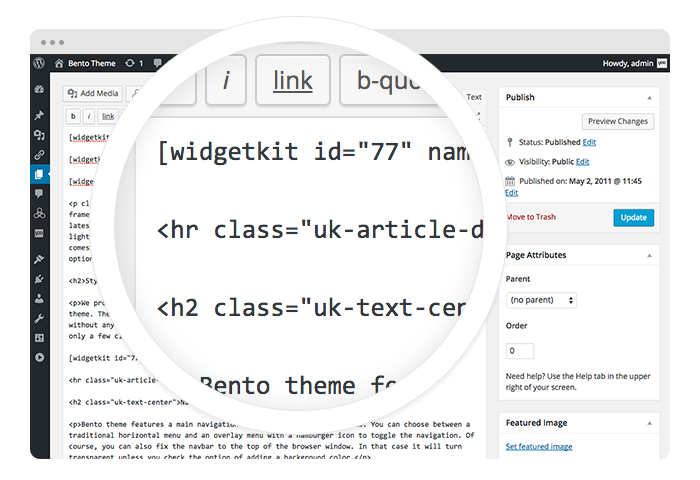
Start in the editor

Start in the editor

To get started, click on the Widgetkit button in your CMS edit view. You will be directed to an overview of already existing widgets, hit the New button. Now choose the widget you would like to render, for example Grid and the content type. Afterwards hit Create to proceed to the next step.
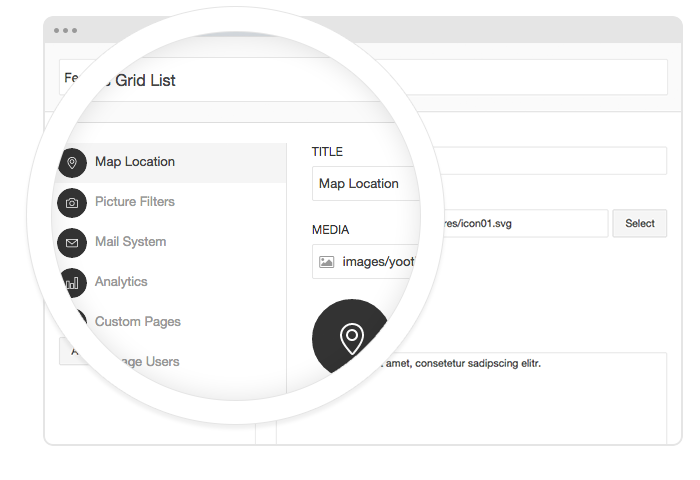

Explore the Interface

Explore the Interface

To create your content, you can add single content items by using Add Item. Alternatively you can use Add Media to select multiple items at once through the media library or manager of your CMS. Enter a name for your widget and go to the Settings tab to configure your widget, then hit Save.
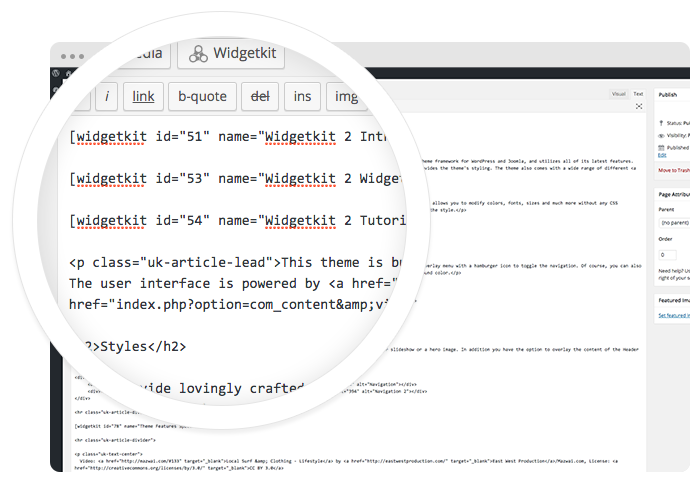

Using the shortcodes

Using the shortcodes

After saving, hit the Cancel button to get back to the widget overview. Click on your newly created widget and a shortcode containing the widget's ID and name will be inserted in the editor. To edit the widget, click inside the shortcode and hit the Widgetkit button again.


Features

All widgets make use of modern web technologies

  • All widgets are fully responsive
  • Use shortcodes to show widgets anywhere
  • Clean and lightweight code
  • User friendly interface
  • Supports touch gestures for mobile devices
  • Built with the UIkit framework

Запишитесь на юридическую консультацию

Запись на юридическую консультацию
Имя и фамилия контактного лица *

Please type your full name.
E-mail *

Invalid email address.
Телефон:

Invalid Input
Примечание (суть вопроса):

Invalid Input
Проверочный код *
Проверочный код
  Обновить
Invalid Input
*

Подтвердите согласие на обработку персональных данных Соглашение на обработку персональных данных


Свяжитесь с нами

8 (495) 589-50-33

117046, г. Москва, ул. Гримау, д. 10. Станция метро Академическая – (3 мин. пешком).


info@pravomoscow.com
www.pravomoscow.com

Прием осуществляется по предварительной записи.

Ждем Вас